

The landscape of software engineering is undergoing a monumental shift. Generative AI is no longer just an experimental autocomplete feature; it has evolved into an active development partner. For AI engineers and software developers alike, navigating this ecosystem requires more than just knowing which buttons to press—it demands a deep understanding of how these tools operate, how the underlying models function, and the mental framework required to use them effectively.
This comprehensive guide breaks down the current state of AI-assisted development, explores the mechanics of Large Language Models (LLMs), and outlines the core responsibilities that come with integrating AI into your workflow.
The Mindset Before Implementing AI Tools
Before downloading a single extension or refactoring code with an LLM, a fundamental shift in perspective is required: AI is an accelerator, not an absolute source of truth. The most successful AI-augmented developers adopt a “Reviewer-in-Chief” mindset. Instead of treating AI tools as replacement programmers, look at them as highly capable, incredibly fast junior developers who have memorized vast amounts of documentation but lack critical context and occasionally make confident mistakes.
- Own your code: You are legally and functionally responsible for every line of code committed to your repository, regardless of whether it was written by human hands or generated by a neural network.
- Deconstruct problems first: Never ask an AI to solve a vague problem. Break your architecture down into modular components, and use AI to accelerate the implementation of those specific pieces.
How AI Tools Work
At their core, AI coding tools leverage deep learning models trained on vast repositories of public and open-source source code.
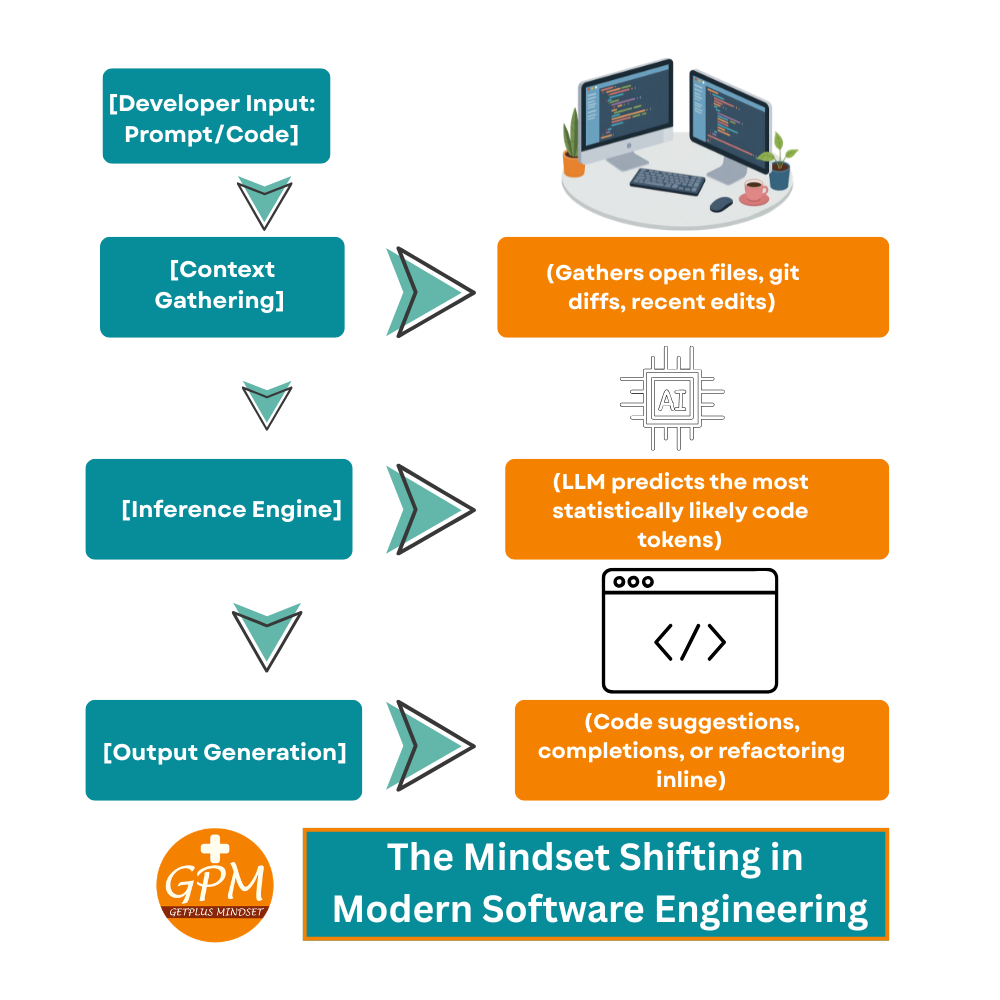
When you write code or type a prompt, the tool captures your active file, nearby snippets, and sometimes your entire project tree (your context window) and sends it to an LLM. The model analyzes the syntax, patterns, and natural language instructions to predict the most statistically probable next tokens (characters or words) that logically complete your task.
AI Tools for Developers: The Current Landscape
The ecosystem of developer tools is expanding rapidly, transitioning from simple code completion to fully autonomous command-line agents.
What is Claude Code?
One of the most significant recent advancements in the agentic AI space is Claude Code. Developed by Anthropic, Claude Code is a research preview of a command-line interface (CLI) tool that allows the Claude model to interact directly with your local development environment.
Unlike traditional chat interfaces, Claude Code can execute terminal commands, read and write files across your repository, run tests, and debug errors autonomously based on your high-level instructions. It represents a shift from “AI as an editor” to “AI as a terminal collaborator.”
The Best Alternative to Cursor AI
While Cursor has gained massive popularity as a dedicated AI-first fork of VS Code, many developers prefer to keep their existing, highly customized development environments.
The strongest alternative to Cursor is Windsurf by Codeium, or utilizing the Continue.dev open-source plugin within standard VS Code or JetBrains IDEs. Continue allows you to connect any local or cloud-based LLM (like Ollama or Anthropic’s API) directly to your existing workspace, giving you Cursor-grade features—like inline code generation and codebase indexing—without migrating to a completely new editor.
List of the Best AI Tools for Developers
- Cursor / Windsurf: Exceptional AI-first IDEs for deep codebase indexing and multi-file edits.
- GitHub Copilot: The industry standard for fast, inline boilerplate generation and autocomplete.
- Continue.dev: The best open-source, highly configurable plugin for custom LLM integration.
- Claude Code / Aider: Powerful command-line AI agents capable of autonomous debugging and git management.
- Ollama: The go-to tool for running powerful open-weights models (like Llama 3 or Mistral) locally on your machine for complete data privacy.
Demystifying the Foundation: Understanding LLMs
To use AI engineering tools effectively, we must lift the hood and understand the mechanics of Large Language Models.
How an LLM Model Works
An LLM is a type of neural network based on the Transformer architecture. It processes text by converting words or sub-words into numerical vectors (embeddings) in a high-dimensional space.
The core engine of the transformer is the Self-Attention mechanism. This allows the model to look at a sentence and mathematically determine how different words relate to one another, regardless of how far apart they are in the text. When you pass a block of code to an LLM, it doesn’t “understand” logic the way a human does; it calculates the mathematical probability of what code should come next based on the patterns it learned during training.
Who Develops the LLM Models?
The frontier models driving modern software development are primarily built by a handful of research institutions and tech giants:
- Proprietary Creators: Organizations like OpenAI (GPT series), Anthropic (Claude series), and Google (Gemini series) build massive, closed-source models accessible via APIs.
- Open-Weights Ecosystem: Companies like Meta (Llama series) and Mistral AI release high-performance model weights to the public, allowing developers to host, modify, and run models locally.
Why Context and Parameters are Crucial for Accuracy
An LLM’s performance hinges on two critical vectors:
- Context Window: This is the temporary working memory of the model during a single session. If an AI tool cannot fit your relevant helper functions, database schemas, and active files into its context window, its output will lack accuracy and relevance, often resulting in broken code.
- Parameters: These are the internal weights and configurations the model adjusted during training. A model with more parameters generally possesses a deeper capacity for complex reasoning, but requires significantly more computational power to run.
Training, Fine-Tuning, and Limitations
Building and optimizing these models involves distinct phases, each carrying its own constraints.
Efficient Training of LLMs
Training a base LLM from scratch requires vast datasets and immense computational clusters running for weeks or months. Because of this high cost, the industry relies on Efficient Training and Adaptation techniques.
Methods like Parameter-Efficient Fine-Tuning (PEFT) and LoRA (Low-Rank Adaptation) allow engineers to freeze the core billions of parameters of a base model and only train a tiny, specialized layer of weights. This drastically reduces the computational footprint while teaching the model specific coding languages, styles, or internal company frameworks.
What are the Limitations of AI Tools and Fine-Tuning?
Despite their power, AI tools face rigid bottlenecks:
- The Freshness Problem: LLMs are frozen in time based on their last training cutoff. They cannot inherently know about a library update or a new API framework released yesterday.
- Fine-Tuning is Not Knowledge Injection: A common misconception is that fine-tuning is the best way to teach a model facts. Fine-tuning excels at adjusting tone, style, and syntax structure. For injecting factual, up-to-date data (like a private codebase), Retrieval-Augmented Generation (RAG)—where the tool searches documentation and pastes it into the prompt context—is far more effective.
- Hallucinations: When context is missing, models will confidently generate syntheses that look syntactically correct but call non-existent methods or libraries.
Ethical and Social Risks from LLMs
As AI engineers, we must remain aware of the broader implications of our tooling:
- Code Plagiarism and Licensing: LLMs trained on public data can occasionally reproduce snippets of copyleft or strictly licensed code without proper attribution, raising legal liabilities.
- Security Vulnerabilities: If a model was trained on legacy code containing SQL injections or outdated cryptographic libraries, it will happily suggest those same vulnerabilities to you. Code must always go through automated linting and security scanning.
- The Skill Regression Risk: Over-reliance on autocomplete can degrade a developer’s foundational problem-solving skills and spatial awareness of their own architecture.
Conclusion & Next Steps
AI tools are redefining productivity, but they don’t replace the core of engineering: systemic design, critical thinking, and architectural oversight. The developers who thrive in this new era will be those who master both the tools and the underlying mechanics of the models powering them.
Take Your Development Workflow to the Next Level
Are you ready to transition from basic prompt engineering to building robust, autonomous AI workflows? Subscribe to our youtube channel Getplus Mindset for weekly deep dives into local LLM deployments, advanced architecture design, and production-ready AI engineering insights.