

Nearly 90% of the SMB (Small to Medium Business) web is powered by WordPress, WooCommerce, Shopify, or PHP-based framework. The “best” technology depends entirely on your business model. If you are a law firm, restaurant, consultant, local contractor, or blogger, the winner is WordPress. You primarily need to display information, capture leads (contact forms), and rank on Google. WordPress is the undisputed king of SEO (Search Engine Optimization). It is free to use (you only pay for hosting, ~$10/mo), and you can easily update text and images yourself without a developer.
If you are selling Physical Products like clothes, candles, electronics, or dropshipped goods, you can select Shopify or Woocommerce. Platforms like Shopify handles Hosting, security, and checkout compliance all for your business. For example, you are a content creator who also sells merch, or a service business that also sells digital downloads. You already have a WordPress site or want full control over your data and lower monthly fees. The winner is WooCommerce. It plugs right into WordPress. It’s free to install, and unlike Shopify, you don’t pay extra transaction fees to the platform. It is infinitely customizable but requires more “care and feeding” (updates, backups) than Shopify.
If your business model is like you aren’t just selling a product; you are building a tool. Maybe a custom booking system for pet sitters, a real-estate portal with complex filters, or a subscription-based software. The winner is Laravel. WordPress and Shopify will break if you try to bend them too far. Laravel is a framework for building custom applications. It costs more upfront to build (you need a specialized developer), but it will do exactly what you need without the “bloat” of a CMS. One final tip – please do not use any website builder tool.
If you are looking for a job in the U.S. web development market, you might hear about the latest JavaScript frameworks like Next.js, Svelte, or Astro. But if you look at the actual paying clients—the local bakeries, the mid-sized e-commerce brands, the marketing agencies, and the B2B service providers—a staggering majority of them rely on four key technologies: WordPress, WooCommerce, Shopify, and Laravel.
Here is the data breakdown of why 80-85% is the hard number, and where the missing 10-15% comes from:
WordPress powers roughly 43% of the entire web.
WooCommerce runs nearly 20-25% of all e-commerce sites.
Shopify dominates the U.S. e-commerce market with a ~30% share.
PHP Dominance (76.5%): According to W3Techs, 76.5% of all websites with a known server-side language use PHP. Laravel is the undisputed king of PHP frameworks for custom business applications.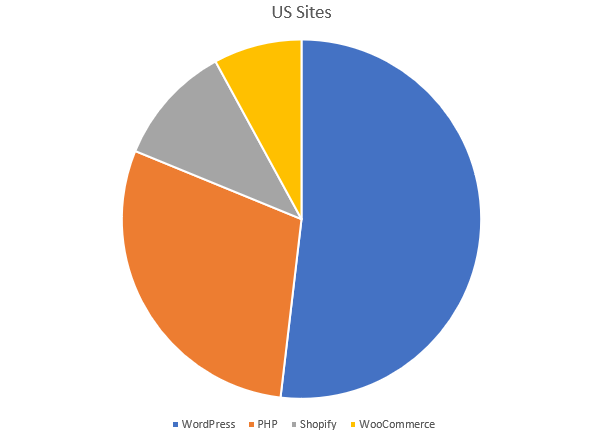
This figure includes WordPress, WooCommerce, Laravel, and “Core PHP” custom scripts.
The Shopify Add-on (+6%): Shopify is not PHP-based (it uses Ruby), so it adds to that 76% figure.
Shopify powers roughly 6% of all websites globally (and about 28-30% of U.S. eCommerce specifically).
The Math: 76.5% (PHP Ecosystem) + 6% (Shopify) = ~82.5%.
What makes up the missing ~17%?
Wix & Squarespace (~8%): These two SaaS builders combined power a huge chunk of small business sites.
ASP.NET & Java (~5-8%): These dominate the Large Enterprise sector (banks, insurance, Fortune 500), which are technically “U.S. business websites” even if they aren’t your target audience.
Here is the learning path:
Foundations – HTML + CSS + basic JavaScript (DOM, fetch API).
Server‑side basics – PHP syntax, control structures, OOP, and how to connect to MySQL (SQL basics).
WordPress & WooCommerce – WordPress theme hierarchy, plugin development, WooCommerce hooks; practice building a simple theme/plugin (PHP + MySQL + HTML/CSS/JS).
Shopify – Learn Liquid templating, then build a custom Shopify theme (Liquid + HTML + CSS + JS). If you want to extend Shopify with apps, add Node.js (JavaScript) and optionally Ruby on Rails.
Laravel – Install Laravel, learn routing, controllers, Eloquent ORM (PHP + MySQL). Study Blade templates and how to integrate Vue/React for richer UIs; practice asset bundling (Vite/Tailwind).
Full‑stack integration – Build a headless project (e.g., Laravel API + Vue front‑end, or WordPress REST API + React front‑end) to cement the “full‑stack” mindset.
By mastering HTML, CSS, JavaScript, PHP, SQL (MySQL), Liquid and Blade, plus the optional Node.js / Ruby for Shopify‑app development, a student will have the complete language toolbox to work.
If you want to be a Full-Stack Developer who never runs out of work, mastering this stack is the safest bet you can make. Here is your roadmap from zero to “Hired.”
Phase 1: The Non-Negotiable Foundation
Before you touch a CMS or a Framework, you need the “Web Primitives.” All four of these platforms rely heavily on these basics. Do not skip this.
HTML5 & CSS3: Mastery of semantic HTML, Flexbox, and CSS Grid.
JavaScript (ES6+): You don’t need React yet, but you need to know DOM manipulation, fetch API, and event listeners.
PHP (The King of the Backend): * Why? WordPress, WooCommerce, and Laravel are all PHP-based.
Focus on: Syntax, Arrays, Loops, and—crucially—Object-Oriented Programming (OOP). You cannot master Laravel or advanced WordPress without OOP.
Databases (MySQL): Learn how to write raw SQL queries (SELECT, UPDATE, JOIN) before relying on tools to do it for you.
Phase 2: The Content & Commerce Giants (WordPress & WooCommerce)
The Goal: Move beyond “installing themes” to building custom digital experiences.
Step 1: “The Theme Developer” (Frontend Focus)
Template Hierarchy: Understand which file (single.php, archive.php) controls which page.
The Loop: Master the core logic of retrieving posts in WordPress.
Hooks (Actions & Filters): This is the secret sauce. Learn how to inject code into the header, footer, or checkout page without touching the core files.
WooCommerce Templating: Learn how to override the default WooCommerce product page and cart layouts using your theme.
Step 2: “The Plugin Developer” (Backend Focus)
Custom Post Types (CPT) & Taxonomies: Build data structures that go beyond “Posts” and “Pages” (e.g., “Real Estate Listings,” “Staff Members”).
Options API & Metadata: Learn how to save custom settings and fields to the database.
REST API: Learn to expose WordPress data to other apps or frontends.
Milestone Project: Build a custom WooCommerce theme from scratch (no page builders) that includes a custom plugin to add a “Gift Wrap” option at checkout.
Phase 3: The E-Commerce Titan (Shopify)
Shopify is SaaS (Software as a Service), so you don’t manage the database or server. Your role here is customization.
Step 1: Liquid Literacy
Liquid Template Language: This is Shopify’s version of PHP. Learn the syntax: {{ output }}, {% logic %}, and filters {{ price | money }}.
JSON Templates: Modern Shopify 2.0 themes use JSON templates. Understand how sections and blocks work.
Step 2: The Ecosystem Developer
Shopify CLI: Learn to develop themes locally and sync them to the live store.
Storefront API: Learn how to fetch product data using GraphQL. This is essential for building “Headless” storefronts or custom landing pages.
Remix (React): Shopify has adopted Remix for building custom apps. If you want to build backend apps for Shopify, you now need to know React and Node.js.
Milestone Project: Create a custom Shopify 2.0 theme section that allows a merchant to drag-and-drop a “Shoppable Lookbook” onto their homepage.
Phase 4: The Architect (Laravel)
When a client needs something more complex than a blog or a store—like a SaaS platform, a booking system, or a customer portal—you use Laravel.
Step 1: The MVC Pattern
Model-View-Controller: Understand how to separate your logic (Controller), your data (Model), and your UI (View).
Routing: Learn how Laravel handles URL requests.
Step 2: Data Mastery (Eloquent)
Eloquent ORM: This is Laravel’s superpower. Learn how to interact with your database using PHP syntax instead of SQL (e.g., User::all()).
Relationships: Master HasOne, HasMany, and BelongsToMany.
Step 3: The Full-Stack Toolkit
Blade Templates: The frontend engine of Laravel.
Livewire (The Game Changer): Learn Livewire to write “JavaScript-like” interactive frontends using only PHP. This is a massive trend in the Laravel community.
Filament: The ultimate admin panel builder for Laravel. Mastering this will speed up your development time by 10x.
Milestone Project: Build a SaaS application (e.g., a Project Management Tool) where users can register, create teams, and assign tasks, utilizing a monthly subscription model (integrated with Stripe).
The modern, recommended architectural and development practices for scalable Laravel applications focus heavily on clean organization, performance optimization, API-first methodologies, and adopting specialized architectural patterns beyond traditional MVC.
1. Architectural Patterns for Scalability
For projects that require long-term maintainability and scaling, developers should choose an architecture appropriate for the application’s complexity and anticipated scale.
• Domain-Driven Design (DDD): DDD is recommended for complex applications with rich business logic and is considered essential for modern development (2025-2026 practices). This approach structures code around business domains (e.g., User, Order, Payment) rather than technical layers, which improves maintainability as the application grows.
• Modular Monolith vs. Microservices:
◦ It is generally recommended to start with a Modular Monolith using Laravel Modules, ensuring clear boundaries and namespace separation between features.
◦ The Microservices approach is reserved for very large applications or large teams, involving separate Laravel applications communicating via APIs. This often requires implementing service discovery and API gateway patterns.
• Event-Driven Architecture (EDA): EDA is key for better scalability and maintainability. This involves modeling state changes as Event Sourcing and using Message Queues for asynchronous processing and system resilience.
2. Core Development and Code Organization
For cleaner code organization and enhanced development efficiency:
• Domain Logic Implementation: When using DDD, implement domain models, use repositories for data access abstraction, and develop service layers to encapsulate business logic.
• Action Pattern: Extract complex logic from controllers into dedicated, single-responsibility action classes (or actions).
• Data Objects: Use DTOs (Data Transfer Objects) to create structured data objects, preventing the passing of unstructured arrays. Similarly, use Value Objects for complex data types that require specific validation.
• Code Standards: Follow PSR Standards (e.g., PSR-3, PSR-4, PSR-12) to ensure code is predictable and easier to trace using monitoring tools.
• Route Management: Use route grouping, prefixes, and namespaces for clear organization, and leverage Route Caching in production for performance.
3. Performance and Optimization
Achieving high performance and scalability relies on strategic framework usage and efficient resource management:
• PHP Version: Adopt PHP 8.x and beyond for performance gains, better error reporting, and improved type safety.
• Laravel Octane: Utilize Laravel Octane with Swoole or RoadRunner to boost performance significantly by keeping the application in memory for high-concurrency handling.
• Database Optimization:
Design the database with scalability in mind, considering strategies like sharding for very large datasets.
◦ Optimize Eloquent queries, specifically using eager loading to prevent the N+1 query problem, which is a common cause of slowdowns under real traffic.
◦ Index frequently queried columns and consider read/write separation for high-traffic applications.
• Caching: Implement multi-level caching strategies, including database query caching, using Redis for fast in-memory caching, and applying cache tagging for selective invalidation.
• Jobs and Queues: Offload heavy processing tasks to background jobs using reliable queue drivers like Redis or database queues. Use Laravel Horizon for queue management in production.
4. API and Frontend Development
Modern Laravel applications should adopt an API-first approach and choose frontend tools based on team expertise:
• API-First Approach: Follow RESTful conventions, version your APIs, and define strict API Schemas for validation.
• API Implementation Tools:
◦ Use Laravel API Resources for consistent JSON transformations.
◦ Implement API documentation using tools like OpenAPI/Swagger.
◦ For complex data needs, consider GraphQL (e.g., implemented via Lighthouse PHP).
• Frontend Choices (for SPAs):
◦ Laravel Livewire is recommended if the team is more back-end oriented, as it facilitates dynamic interfaces without requiring extensive JavaScript coding.
◦ Inertia.js is recommended if the team is already familiar with frameworks like React, Vue, or Angular, allowing them to integrate these tools seamlessly while still using Laravel’s core routing and controllers.
5. DevOps and Observability
To ensure reliability, robust DevOps practices and real-time monitoring are necessary:
• CI/CD: Implement automated deployment pipelines (CI/CD) to run tests automatically and automate deployment only when tests pass.
• Zero-Downtime Deployment: Use tools like Envoy or Deployer, and implement advanced strategies such as blue-green or canary deployments.
• Monitoring and Tracing:
◦ Set up comprehensive monitoring and logging infrastructure.
◦ Use an Application Performance Monitoring (APM) tool (like Laravel Telescope or Atatus) to track key metrics like response times, error rates, database latency, and memory usage in real time.
◦ Implement distributed tracing for complex or microservice architectures to track requests across service boundaries.
◦ Utilize PHP profiling in production to pinpoint functions consuming the most resources, which helps detect performance regressions.
As applications become more complex, shifting from traditional monolithic MVC to DDD or Modular Monoliths—supported by tools like Laravel Octane and robust monitoring—acts like moving a growing city from a single water pump to a sophisticated network of reservoirs and pipes, ensuring fast, clean service no matter how large the population gets.
To truly be a master, you should aim for this specific combination of technologies, which bridges all four platforms:
Language: PHP 8.2+ (Solid OOP skills)
Frontend: Tailwind CSS (Used heavily in modern Laravel, Shopify, and WordPress themes)
JavaScript: Alpine.js (Lightweight, perfect for WP/Laravel) or Vue.js
Tooling: Composer (PHP packages) and NPM (JS packages)
Mastering these four doesn’t just make you a developer; it makes you a business solution provider.